
What’s new in PEG Audit Spring 2025 (v 2.1883.0)
Here's a list of what's new in the PEG Audit Spring 2025 release.
New features and enhancements
Not-for-profit engagement support
PEG Audit now supports not-for-profit engagements. Note that the Organization Type of your entity is required to be set as Registered Charity or Not For Profit to display the not-for-profit content in your engagement. To learn how to set the Organization Type of your entity, refer to Create client entities.

The documents below have been updated to display not-for-profit content when applicable:
-
030 Client queries – Initial client queries
-
510 Identifying risk through understanding the entity
-
681 NFP – Supplementary audit procedures
-
PEG FRF971 – First-time adoption of ASNPO and FRF973 Worksheet - ASNPO - Combinations by not-for-profit organizations have been authored in this document
-
C Accounts receivable, trade and other
-
U Property, plant and equipment
-
V Collections
-
W Intangible assets
-
MM Deferred contributions
-
TT Net assets
-
705 Revenue
-
FRF906 ASPE – General financial statement presentation
-
FRF972 ASNPO – General financial statement presentation
-
109 Financial statements optimiser
-
110 Financial statements
Note disclosures for not-for-profit engagements
We have added additional note disclosures specific to not-for-profit engagements:
-
Purpose of the organization
-
Basis of presentation
-
Summary of significant accounting policies: Basis of presentation
-
Summary of significant accounting policies: Fund accounting
-
Summary of significant accounting policies: Revenue recognition – Restricted fund method
-
Summary of significant accounting policies: Revenue recognition – Deferral method
-
Summary of significant accounting policies: Contributed services
-
Summary of significant accounting policies: Donated goods
-
Summary of significant accounting policies: Property, plant and equipment
-
Summary of significant accounting policies: Callable debt
-
Summary of significant accounting policies: Measurement uncertainty
Financial groups for not-for-profit organizations
We have created financial groups that are common to the following not-for-profit organization types:
-
Condominiums
-
Schools
-
Churches
Additional not-for-profit financial groups will be added in future releases.
Risk library
The risk library has been updated to include additional risks specific to not-for-profit engagements.
Intangibles and goodwill
W Intangible assets and goodwill has been split into W Intangible assets and Y Goodwill. Y Goodwill is only available in for-profit engagements.
Validis integration
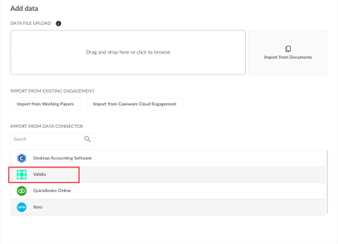
Validis is a software application that supports data extraction, such as trial balance and general ledger data, from various accounting packages. Validis has been added as a data connector on the Datasets tab on the Data page.
Note: You will need a license from Validis to enable this support for your Caseware app. To learn more, you can refer to Validis to acquire a license and check Enable integration with Validis to enable the integration.
Performance materiality benchmark percentage
Performance materiality can now be set using a benchmark percentage of your choice instead of being restricted to the three options of High risk (65%), Moderate risk (70%), and Low risk (75%).
Customize rounding in the financial statements
You can customize the rounding settings used in the financial statements in the firm template or in an individual engagement file. To learn more, refer to Customize rounding in the financial statements.
Enhancements to engagement lockdown
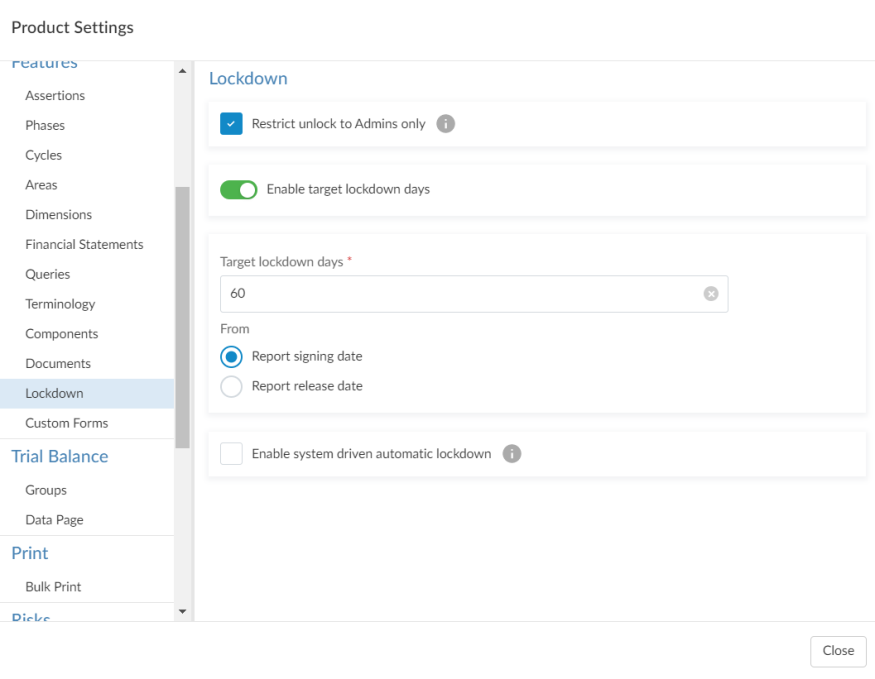
To give you more control over engagement lockdown, a new Lockdown settings section has been added to the Product Settings. Firm authors can select Enable target lockdown days based on either the report signing date or the report release date. If enabled, you can manually enter these dates in the Engagement properties popup.
You can also:
-
Enable automatic lockdown based on the target lockdown days.
-
Restrict the ability to unlock engagements to administrators only.
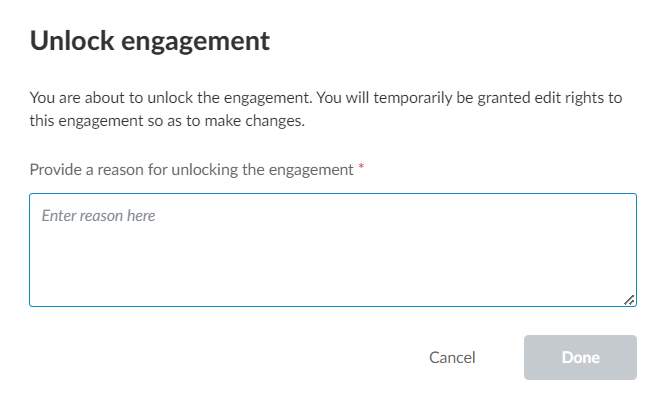
The look and feel of the engagement lockdown process has also been improved.
To learn more, see Customize the lockdown settings and Archive and lock down the engagement.
Lockdown history as a PDF
The lockdown history of the engagement is now included as a PDF when downloading a reference copy. To learn more, refer to Lockdown history as a PDF.
Map dimensions during trial balance import
You can assign dimensions to accounts based on spreadsheet columns in a CSV or Excel file. This provides a streamlined approach to assigning multiple dimensions as part of an Excel/CSV import flow, rather than having to manually assign them. To learn more, refer to Set up and import a trial balance containing dimensions.
Central planning
Central planning allows you to sync risks, controls and selected checklists across engagements, so the work doesn’t need to be duplicated in multiple engagements. To learn more, refer to Set up central planning.
