
New in Caseware Cloud Engagements 2025-08
Welcome to Cloud Engagements 2025-08! This release introduces improvements for tables of contents in Financial Statements and more.
To learn more about the Caseware Cloud Engagements platform, refer to What is Caseware Cloud Engagements?
New toggle for dot leaders in tables of contents
Note: This feature is available for new and existing engagements.
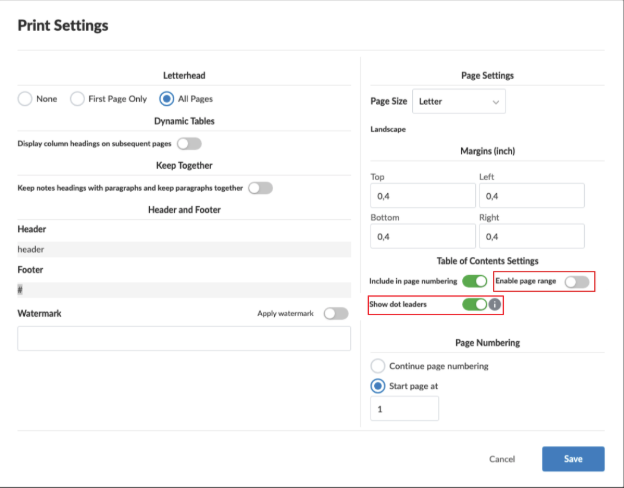
You can now disable or enable the dot leader from the table of contents of your Financial Statements. The default setting for the table of contents includes the dot leader. A toggle for showing or hiding the dot leader can be found in Document Settings | Table of Contents Settings. The dot leader will be removed from both the UI, the print preview and PDF output.
Show page ranges in tables of contents
Note: This feature is available for new and existing engagements.
You can now choose to display full page ranges (for example: “5–6” instead of just “5”) in the table of contents of your Financial Statements. This feature is available when a section spans 2 or more pages. Use the new toggle in Document Settings | Table of Contents Settings to enable this feature. When turned on:
-
Sections spanning multiple pages will show the full range.
-
Single-page sections will continue to show just one page number.
-
This change applies globally across the entire document (no need to set it individually for each section).
To learn more about table of contents within financial statements, refer to Add table of contents in financial statements.
Fixes in Cloud Engagements 2025-08
-
Some tables couldn’t be added to Cloud Connector because their internal IDs were too long, causing them to exceed system limits and fail to load properly.
-
Paragraphs split and text alignment controls stop working after selecting a style when using dynamic texts or placeholders in Financial Statements.
