What's new - PEG ReviewComp Fall 2025 (v1.3036.0)
Here's a list of what's new in the PEG ReviewComp Fall 2025 release.
Content updates
2025 PEG updates
The PEG ReviewComp update includes all updated content based on CPA Canada PEG Review and Compilation Practice Aids up to and including the September 2025 updates.
Here is a list of documents that have been updated.
| PEG form – Content updates | PEG ReviewComp document(s) - Content updates |
|---|---|
| RL1.1 Engagement letter – Review | 1-50 Review engagement letter |
| CL1.1 Engagement letter – Compilation | 1.10 Compilation engagement letter |
| CL1.2 Management acknowledgement – Compilation | 1.20 Management acknowledgement - Compilation |
| FRF906 ASPE – General | FRF-906 ASPE - General financial statement presentation
|
| FRF907 First-time adoption of ASPE | 3-97 Worksheet - ASPE supplementary |
| FRF908 ASPE – Income taxes | 3-FF Income taxes |
| FRF909 ASPE – Investments | 3-B Investments |
| FRF910 ASPE – Leases | FRF-906 ASPE - General financial statement presentation |
| FRF911 ASPE – Goodwill and intangible assets |
|
| FRF912 – Employee future benefits | 3-97 Worksheet - ASPE supplementary |
| FRF913 – ASPE – Supplementary |
|
| FRF915 – ASPE – Business combinations | 3-97 Worksheet - ASPE supplementary |
| FRF971 – First-time adoption of ASNPO | 3-98 Worksheet - ASNPO supplementary |
| FRF972 – ASNPO – General |
|
| FRF973 – ASNPO – Combinations by not-for-profit organizations | 3-98 Worksheet - ASNPO supplementary |
New features and enhancements
Add custom financial groups, areas and cycles to Account tables within the Analysis tab
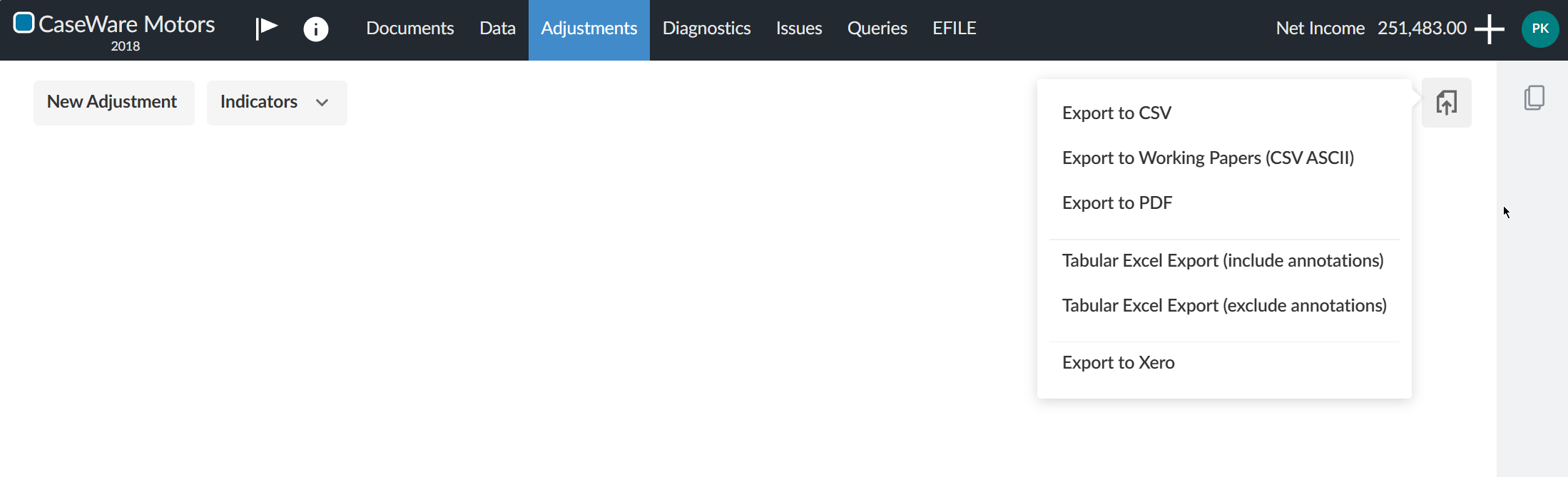
You can now include custom financial groups, areas and cycles to Accounts tables within the Analysis tab. You can modify the checklist settings to include custom financial groups, areas and cycles using the radio button for selection. Ensure you select the Custom accounts table from the Analysis dropdown, as well as Include selections in analysis.
To learn more, refer to Add custom groups, cycles or areas to the analysis tables.
Note: This option is not available for Overview or Ratios tables.
Adjusting entries: New export options
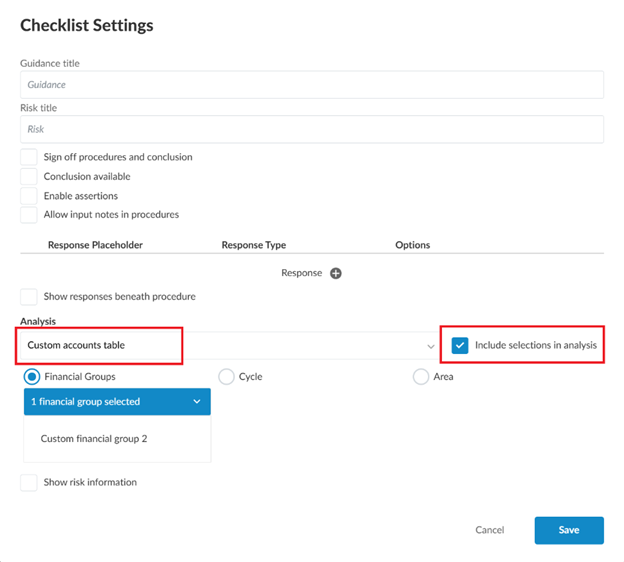
You can now export adjusting entries in PEG ReviewComp using three new options:
-
Tabular Excel export (include annotations) – Export entries with annotations for a complete record.
-
Tabular Excel export (exclude annotations) – Export entries without annotations for a streamlined view.
-
Export to Xero – Send adjusting entries directly to Xero to simplify your workflow.
These options help you work more efficiently and tailor exports to your needs. To view the new export options, go to Adjustments and select Export Options [ ] in the upper right corner.