What’s new in AiDA 2025-04
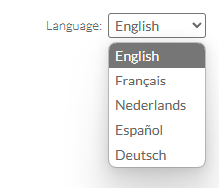
Welcome to the Caseware AiDA 2025-04 release! This release introduces a knowledge base for IDEA, source material references for linkable knowledge bases as well as a list of newly supported languages, including French, Spanish, Dutch, German, Danish and Croatian.
IDEA Help knowledge base
If you are an IDEA user, you have the option of using the newly added IDEA knowledge base to help you get the most out of IDEA.
To use the IDEA Help knowledge base:
-
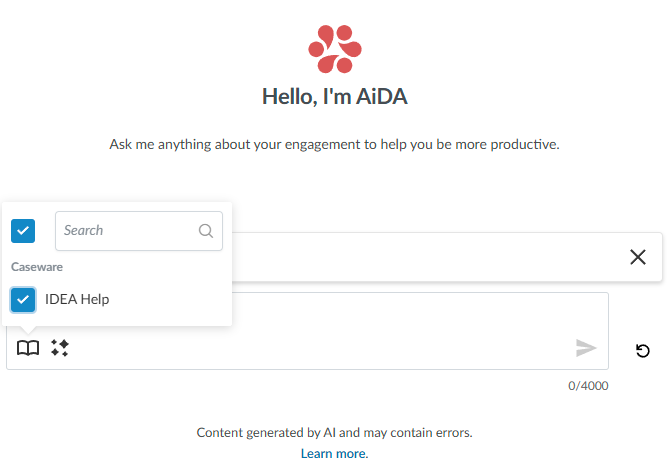
Scroll to the bottom of the AiDA chat window and click the Knowledge Base icon (
 ).
). -
Select IDEA Help.
-
In the text box, type your question related to IDEA and click Send (
 ).
).
Some of the key things the IDEA knowledge base can help you with include:
-
Product documentation: Access detailed guides, tutorials, and user manuals for IDEA and its various modules and features.
-
Troubleshooting: Find solutions to common issues and errors you may encounter when using IDEA.
-
Tips and tricks: Discover best practices, productivity hacks, and hidden features to improve your IDEA workflow.
-
Integration guides: Learn how to connect IDEA with other Caseware products like Working Papers.
References to linkable knowledge bases
Note: This feature is not currently available in IDEA.
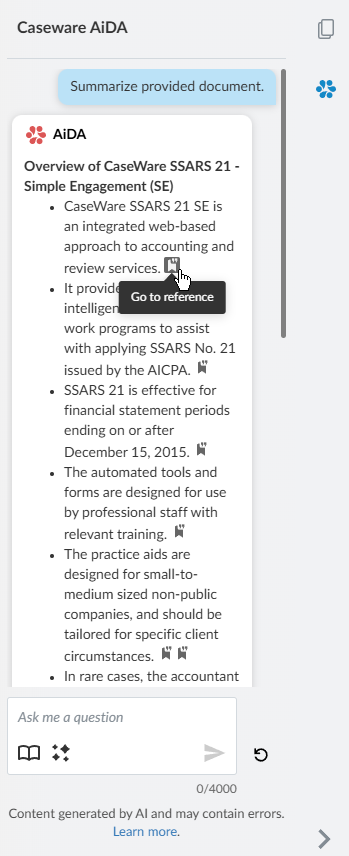
AiDA now supports references to source materials in the knowledge base of your choice if the knowledge base you select supports linkable references. Select the Knowledge Base icon (). Select the knowledge base that interests you, enter your query and click Send (). Click one of the Go to reference icons ( ) at the end of the paragraphs in the response to view source materials AiDA used to create the response.
Multilingual support
AiDA now supports these languages: French, Spanish, Dutch, German, Danish and Croatian. Before logging in to Caseware Cloud, select the language you want to use in Language.