
Client correspondence (Queries)
Note: Caseware Taxflow supports 2022 and 2023 tax exports for C-Corporations, S-Corporations and Partnerships for the following tax vendors:
-
CCH ProSystem fx® Tax
-
CCH Axcess™ Tax
-
Lacerte® Tax
-
GoSystem® Tax
-
UltraTax CS
When performing your tax work, you may need to collaborate with a contact to retrieve additional information. Die Interaktion zwischen einem Mitarbeiter und einem Kontakt in Abfragen lässt sich in der folgenden Abbildung zusammenfassen.
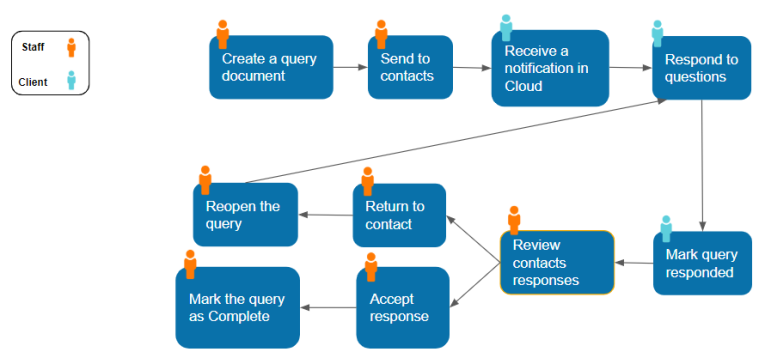
To request information such as the trial balance, financial statements, taxation assessments, or general entity inquiries you can complete the 1-100Q Financial data and general entity information queries and responses query. You can also create and send a new query by selecting Create a document | Query.
After your contact provides the missing information, you’ll receive an email notification with their response. You can review their response and either accept or reopen the query.
To view a list of your queries, go to the Queries page.
Weitere Informationen finden Sie in:
