
New in Caseware Cloud Engagements 2025-10
Welcome to Cloud Engagements 2025-10! This release introduces central planning and data link enhancements, issues and annotations per risk assessment row and more.
On this page, you can view all the new features included in this release that apply to both authors and end users.
To learn more about the Caseware Cloud Engagements platform, refer to What is Caseware Cloud Engagements?
Track changes in the Central Planning hub
#firmauthor #enterpriseauthor #enduser
Note: This feature is enabled automatically in the Caseware Cloud application and applies to both new and existing engagements.
The Central Planning hub now provides more granular details on changes to centrally planned content. You can view added, updated, or removed risks, controls and documents with direct links and item-level details.
The feature improves transparency and traceability for engagement teams and authors by making it easier to identify and review modifications.
To learn more, refer to Get started with central planning.
Improvements to DataLink and conditional formatting in checklist and procedure settings
#enterpriseauthor #enduser
Note: This feature is enabled automatically in the Caseware Cloud application and applies to both new and existing engagements.
You can now access the DataLink Insert Formula button ( ) directly within both the procedure and checklist settings, making it easier to insert dynamic content. Additionally, conditional bullet points are now supported in both procedure and checklist guidance tabs, allowing authors to create more flexible and responsive guidance content. These improvements streamline the authoring process and enhance the clarity of guidance provided to engagement teams.
To learn more, refer to these related topics:
Create issues and annotations on an assertion row in a risk assessment
#enduser
Note: This feature is enabled automatically in the Caseware Cloud application and applies to both new and existing engagements.
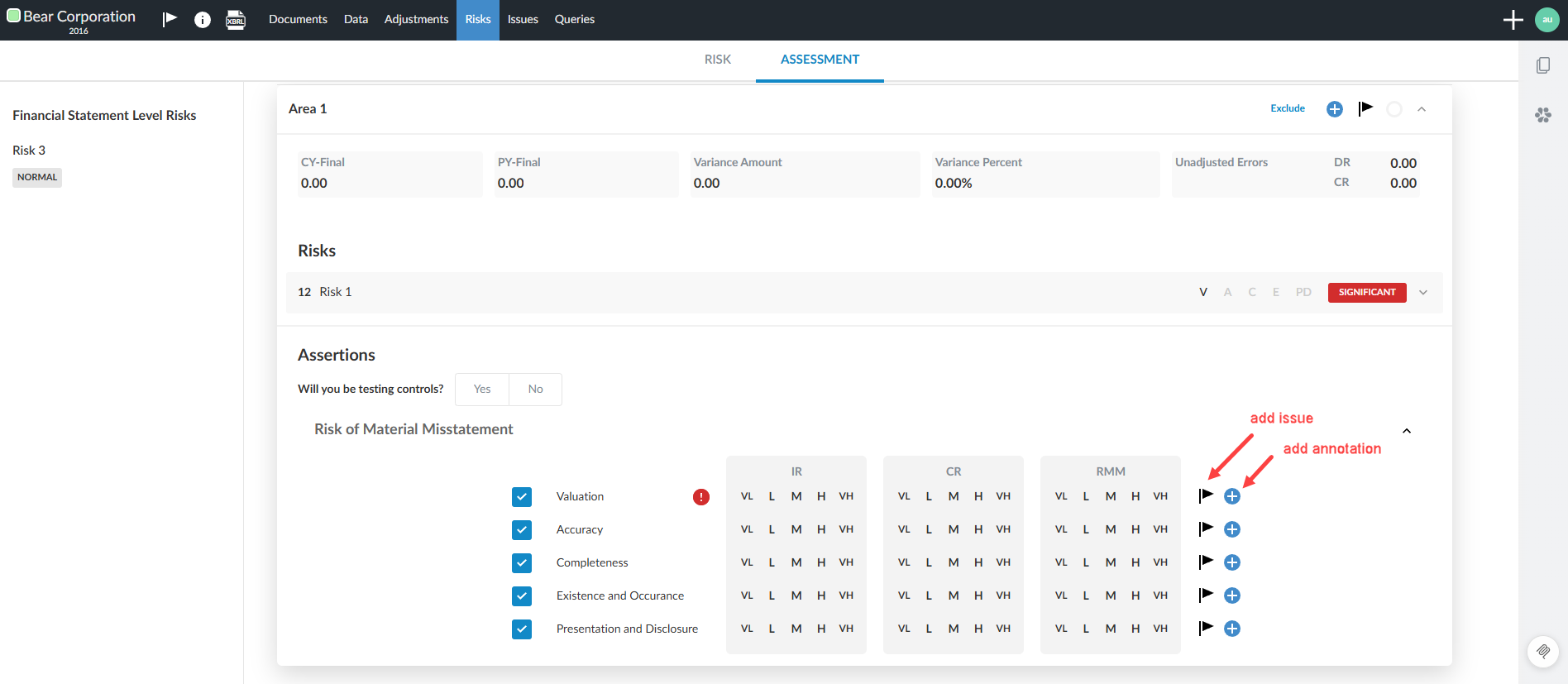
You can add and track issues and annotations where they are most relevant and view related notes in the correct risk assessment section. This helps you keep reviews clear, accurate, and easy to navigate. If you mark an issue as consideration for next year, it will carry forward to future engagements, helping you track recurring or long-term items. Annotations remain engagement-specific so that context stays focused on the current work.
The risk assessment tab displaying the ability to add a risk or annotation:
Post adjustments to accounts not mapped to financial groups
#enduser
Note: This feature is available automatically when unassigned accounts exist and affects both new and existing engagements.
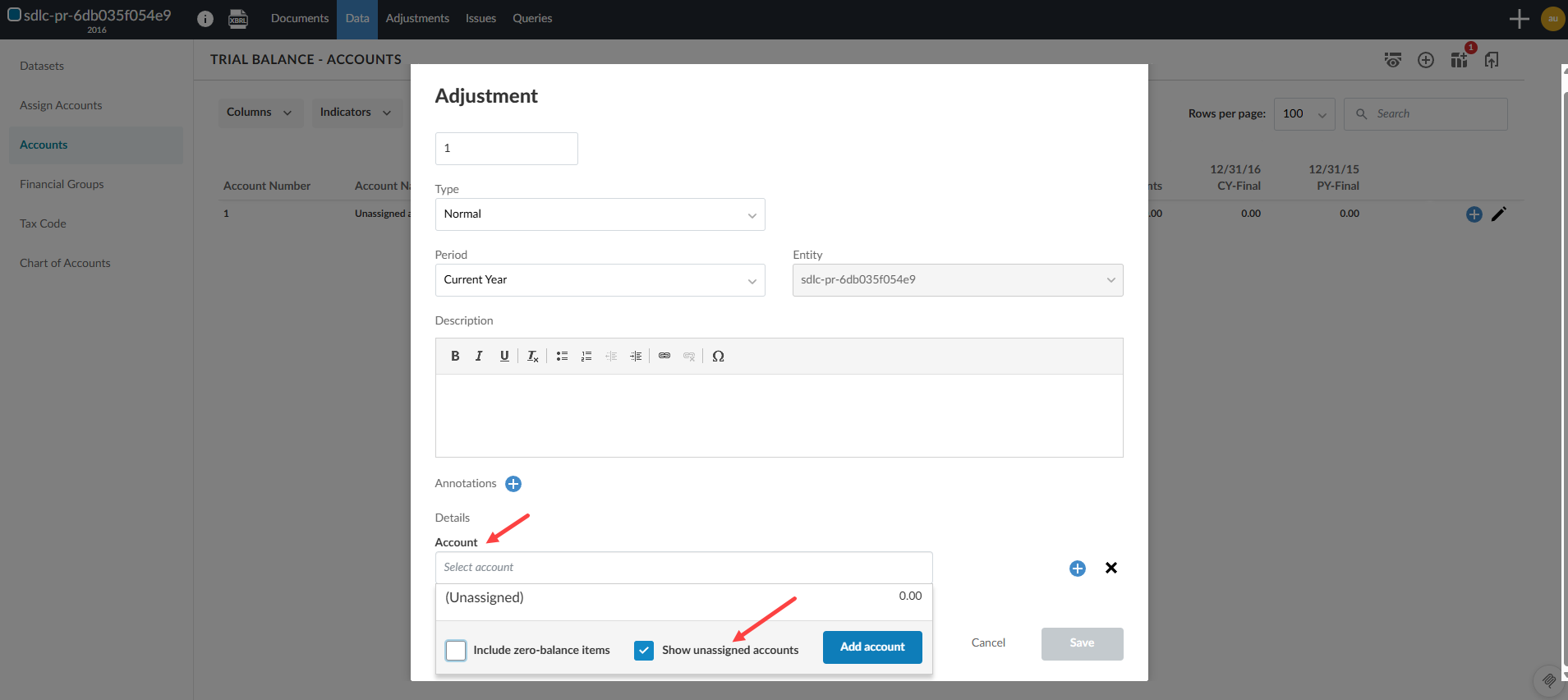
You now have a simplified workflow for managing account adjustments, especially when dealing with accounts that have not yet been mapped to a financial group. A Show unassigned accounts checkbox is now available in the Account selector when adding an adjustment in Accounts. The feature aims to streamline the adjustment process and reduce manual effort.
Feature highlights
-
The option appears only if there are unassigned accounts.
-
The selector respects the zero-balance filter and saves the toggle state to session storage.
-
The Unassigned group appears at the bottom of the list, and the selector jumps to this group when enabled.
Show unassigned accounts in the Add Adjustment dialog:
Validis integration: Planning balances support
#enterpriseauthor #firmauthor #enduser
Note: This feature applies to new and existing engagements in products where it is available.
Planning balances are now available for firms using the Validis integration in Caseware Cloud. If planning balances are available in your product, you can import them when you bring in data using the Validis data connector.
For help importing data, see Import data from online accounting software.
