
Revert changes to default template for text sections or dynamic tables in financial statements
You can revert the content of dynamic tables or text sections to their original state as they were when the engagement file was created. This new option is available in the More actions menu [ ], making it easier for you to restore the initial content if needed.
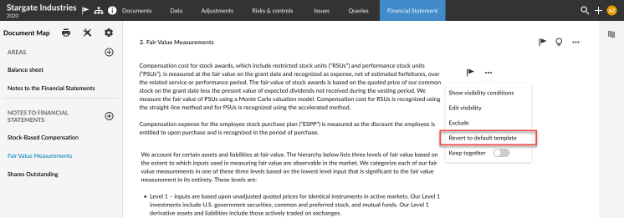
Note: Content will revert to its original source template, not the latest version available, even if authors updated the content of the same Text Section or Dynamic Table.
What won’t be reverted
-
Engagement glossary terms: These will remain unchanged, even if you override the output
-
Data links information, except dynamic text
-
Overridden trial balance amounts in dynamic tables: Reverting these amounts in one table will affect all other tables where the same trial balance item is used. You already have the option to revert any overridden amount to its default on a Dynamic Table Trial Balance row.
