
New in Caseware Cloud Engagements 2025-05
Welcome to Cloud Engagements 2025-05! This release introduces improvements to the carry forward feature in financial statements, multilingual support for materiality and summary of misstatement documents, workflow improvements to Documents and Data pages and more.
Multilingual capabilities in Materiality and Summary of Misstatements documents
The next two feature enhancements are part of a larger initiative to expand multilingual support in Caseware apps.
Note: These enhancements are available only to new engagements.
Materiality document supports multiple languages
Firm authors now have multilingual capabilities in editable fields in the Materiality form. You can select a default language for your engagements and have the additional flexibility to change the language within editable fields.
Editable fields that include multilingual capabilities include:
-
Document and Sections Guidance
-
Sections Titles
-
Tables Headings
-
Overall Materiality - Benchmarks Input fields in Tables (Custom formulas / Other)
-
Performance Materiality & Trivial - % description
-
Conclusion procedures (including conclusion for Group component allocation)
Summary of misstatements supports multiple languages
Similar to the Materiality form, firm authors can now access multilingual capabilities in the Summary of misstatements document, specifically the Guidance and Key Data (input) fields.
Add selected financial groups, areas and cycles to the analysis tables
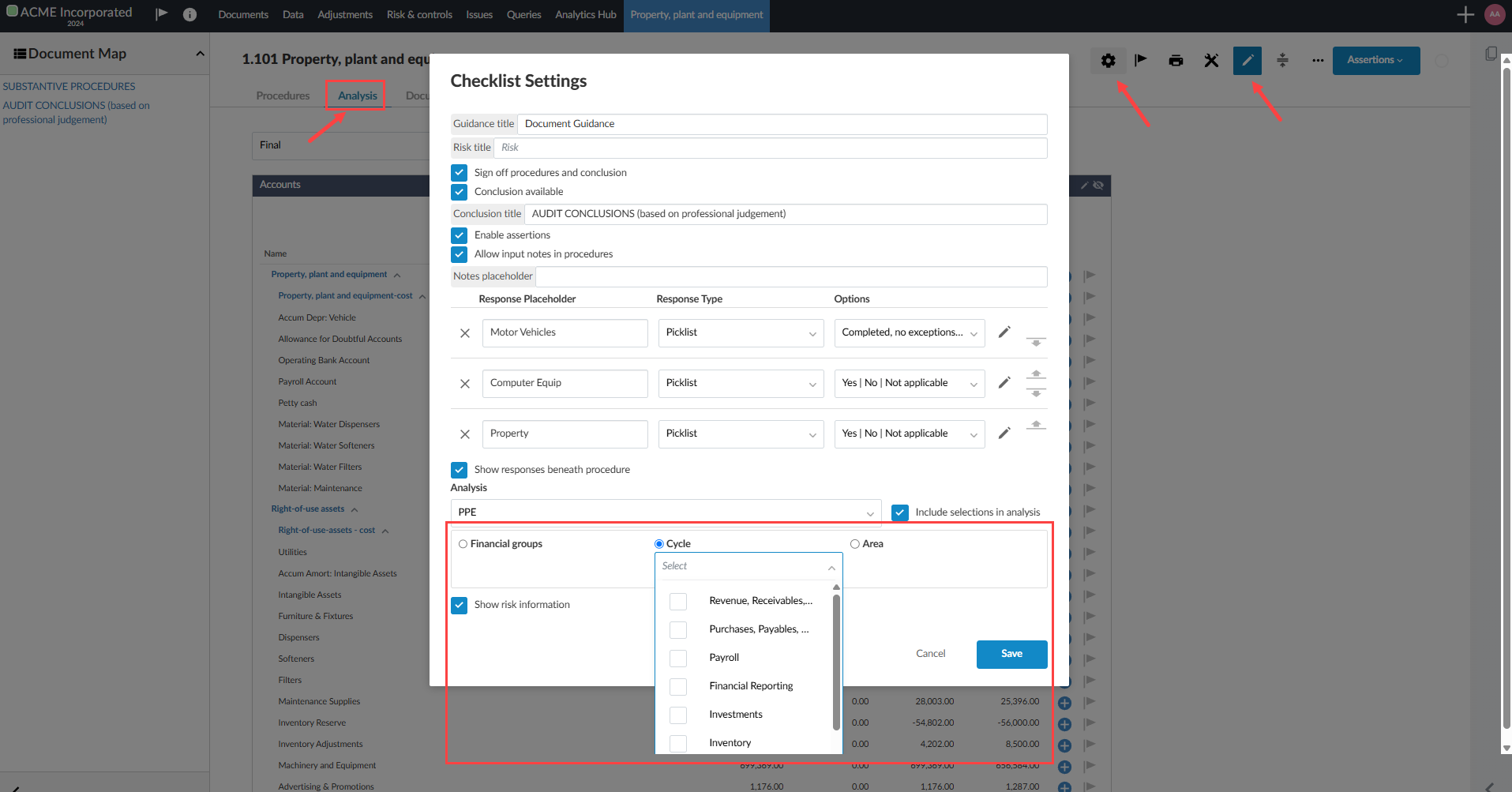
You can now include your own custom financial groups, areas and/or cycles for analysis within your Documents checklists. This can be done from the Analysis tab in your Documents checklist. You can modify the checklist settings to include custom financial groups, areas and/or cycles using the radio button for selection. You can further specify the selection by expanding the dropdown under that category.
Note: This feature is available for new and existing engagements.
Filter the Documents page by document type
A new Document filter button[ ] has been added to the document manager on the Documents page, allowing you to filter documents based on various criteria. What’s more, the filter menu dynamically updates based on the documents and their properties present, providing relevant filtering options as needed.
Note: This feature is available for new and existing engagements.
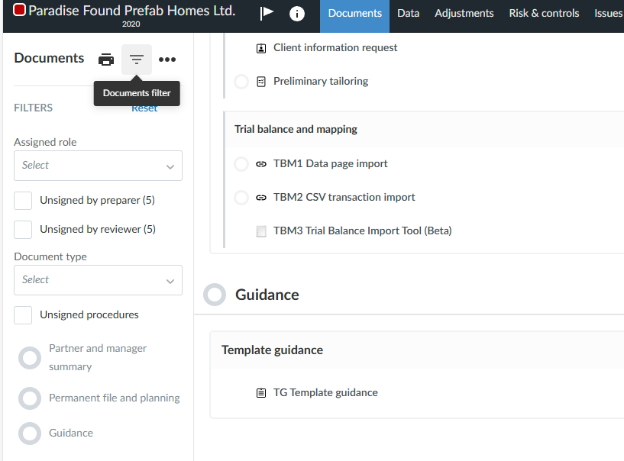
Document types include:
-
Forms
-
Checklists
-
Financial Statements
-
Worksheets
-
Queries
-
Letters/memos very similar; group them together
-
External files such as
-
PDF
-
Word
-
Excel/CSV
Other filter types include:
-
Unsigned reviewer (at least 1 still unsigned reviewer signoff role)
-
Unsigned preparer (at least 1 still unsigned preparer signoff)
-
Documents with a specific signoff role (signed or not)
Assign cycles to financial groups
You can now assign cycles to financial groups from the Data page in their engagements. The ability to assign and see the cycle of a financial group allows users to address why certain groups are showing up in different lead sheets.
Note: This feature is available for new and existing engagements.
Carry forward improvements to financial statements
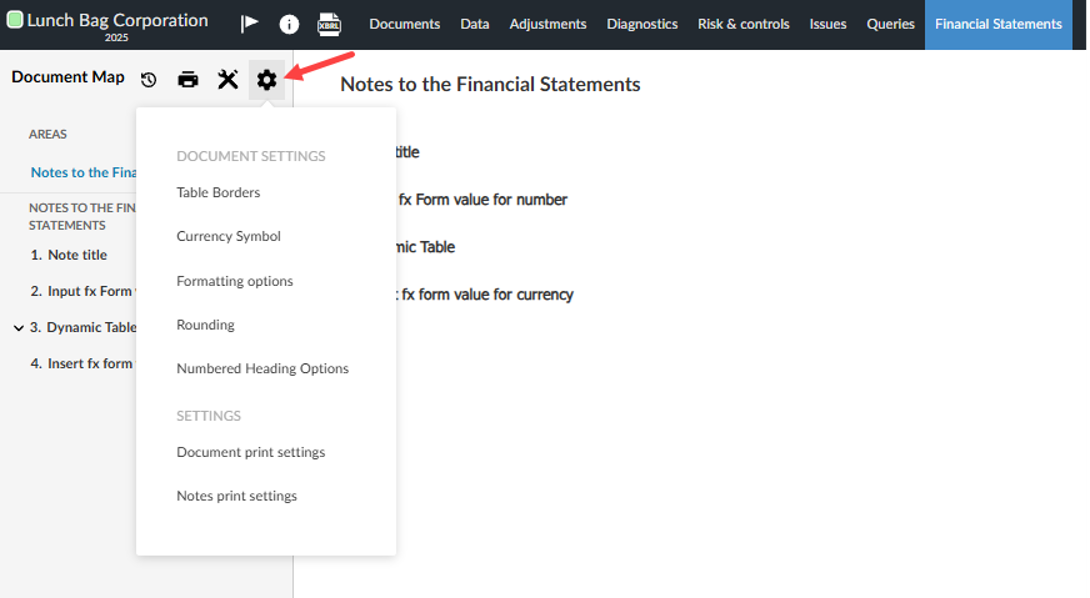
You will notice several improvements to the carry forward feature for financial statements. Carry forward is a time-saving utility that allows you to reuse information from a prior-year engagement in a current-year engagement. Settings, such as currency symbol types, can be carried forward either in bulk or you can select which changes to carry forward into the current engagement.
Note: This feature is available for new and existing engagements.
All options in the following Document Settings can now be carried forward:
-
Currency symbol
-
Formatting
-
Numbered heading
Note: Document Settings for specific numbered heading options can be overridden at the Area level. Area setting changes do not carry forward.
To learn more about carry forward, refer to Carry forward an engagement.
New in Caseware Cloud Engagements 2025-05
Welcome to Cloud Engagements 2025-05! This release introduces improvements to the carry forward feature in financial statements, workflow improvements to Documents and Data pages and more.
Add selected financial groups, areas and cycles to the analysis tables
You can now include your own custom financial groups, areas and/or cycles for analysis within your Documents checklists. This can be done from the Analysis tab in your Documents checklist. You can modify the checklist settings to include custom financial groups, areas and/or cycles using the radio button for selection. You can further specify the selection by expanding the dropdown under that category.
Note: This feature is available for new and existing engagements.
Filter the Documents page by document type
A new Document filter button[] has been added to the document manager on the Documents page, allowing you to filter documents based on various criteria. What’s more, the filter menu dynamically updates based on the documents and their properties present, providing relevant filtering options as needed.
Note: This feature is available for new and existing engagements.
Document types include:
-
Forms
-
Checklists
-
Financial Statements
-
Worksheets
-
Queries
-
Letters/memos very similar; group them together
-
External files such as
-
PDF
-
Word
-
Excel/CSV
Other filter types include:
-
Unsigned reviewer (at least 1 still unsigned reviewer signoff role)
-
Unsigned preparer (at least 1 still unsigned preparer signoff)
-
Documents with a specific signoff role (signed or not)
Assign cycles to financial groups
You can now assign cycles to financial groups from the Data page in their engagements. The ability to assign and see the cycle of a financial group allows users to address why certain groups are showing up in different lead sheets.
Note: This feature is available for new and existing engagements.
Carry forward improvements to financial statements
You will notice several improvements to the carry forward feature for financial statements. Carry forward is a time-saving utility that allows you to reuse information from a prior-year engagement in a current-year engagement. Settings, such as currency symbol types, can be carried forward either in bulk or you can select which changes to carry forward into the current engagement.
Note: This feature is available for new and existing engagements.
All options in the following Document Settings can now be carried forward:
-
Currency symbol
-
Formatting
-
Numbered heading
Note: Document Settings for specific numbered heading options can be overridden at the Area level. Area setting changes do not carry forward.
To learn more about carry forward, refer to Carry forward an engagement.
