Every Caseware Cloud application has a product template configured to help your users create engagements according to industry standards. As a firm author, you can use the product template to enable your users to create engagements. You can also further customize the template, into a firm template, to fit your organization’s standards and requirements.
To understand your role as a firm author, it's helpful to understand the different templates and your author role in Caseware Cloud.
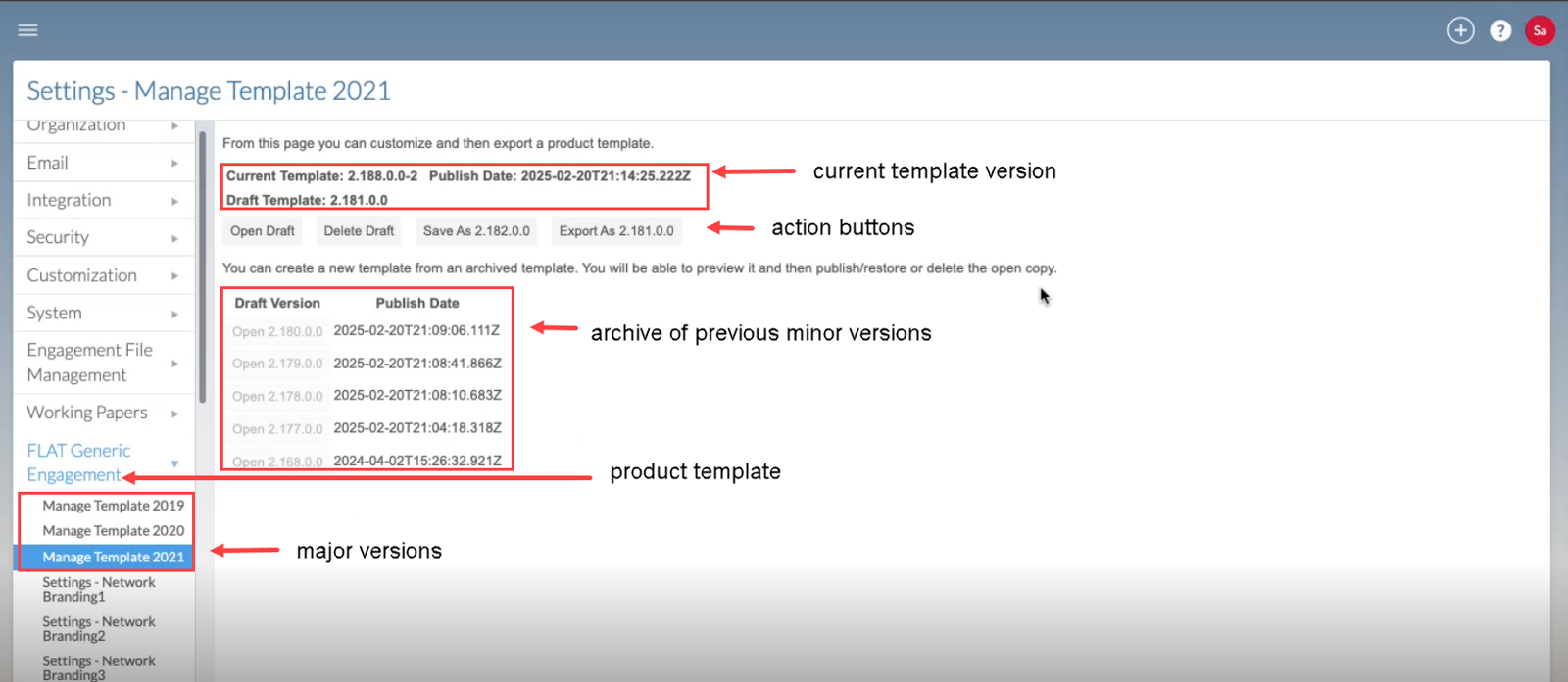
The following illustrates the template management page and its features, including versions of the product template and action buttons for creating, editing and updating the template and related drafts.
The product template contains the default content for your product and is configured by Caseware authors according to industry standards and updated with the latest product features. Firm templates inherit the structure and content of the product template unless customized by the firm author.
A firm template is a customized version of the product template. It is used when your organization wants to apply its own standards to the product template.
In Caseware Cloud, each type of template is managed by a different author. As a firm author, you will use the product template to create the firm template for your users to create engagements.
Responsibilities for firm authors:
Template management: Create, edit, and delete the templates your Caseware Cloud users rely on to create engagements.
Feature customization: Change or add features within your template (for example, components, assertions, areas) to align with your organization’s needs.
Release alignment: Track template version updates and apply the latest changes released by Caseware to keep your template current.
Feature customization allows you to tailor your templates to match the unique needs of your firm. These customizations ensure that each engagement created from the template reflects the organization’s preferred structure while building on the foundation provided by Caseware.
To learn more, refer to the list of customizable features under Setup: Authoring index.
The product template undergoes continuous improvement lifecycles, which include both minor and major updates. These updates are versions of the product template.
Major versions
Major versions of the product template are created by Caseware and updates all enterprise and firm templates.
Major versions are typically pushed annually or when a significant number of updates are required.
Your job as a firm author is to accept the major version update and migrate all firm customizations to your new major version.
For more information on how to accept and apply your firm customization to the latest major version, refer to: Update after a version release.
Minor versions
All authoring levels can release minor versions of their template.
Minor versions released by Caseware push changes to the product template that are minor changes to be adopted across all firms.
If your firm template is customized, accept the update when notified. A new draft will be created with your customizations carried over automatically.
If you have a firm template that uses the product template, minor version updates will automatically be applied.
To learn more about how to manage your firm template, refer to: Manage the firm template.