
Template management for enterprise firm authors
Every Caseware Cloud application begins with a product template. Your enterprise has customized this into an enterprise template. As an enterprise firm author, you use this enterprise template to create engagements for your firm. You can also further tailor it into an enterprise firm template to meet your organization's specific standards.
To understand your role as an enterprise firm author, it's helpful to understand the different templates and your author role in Caseware Cloud.
The following illustrates the template management page and its features, including versions of the product template and action buttons for creating, editing and updating the template and related drafts.
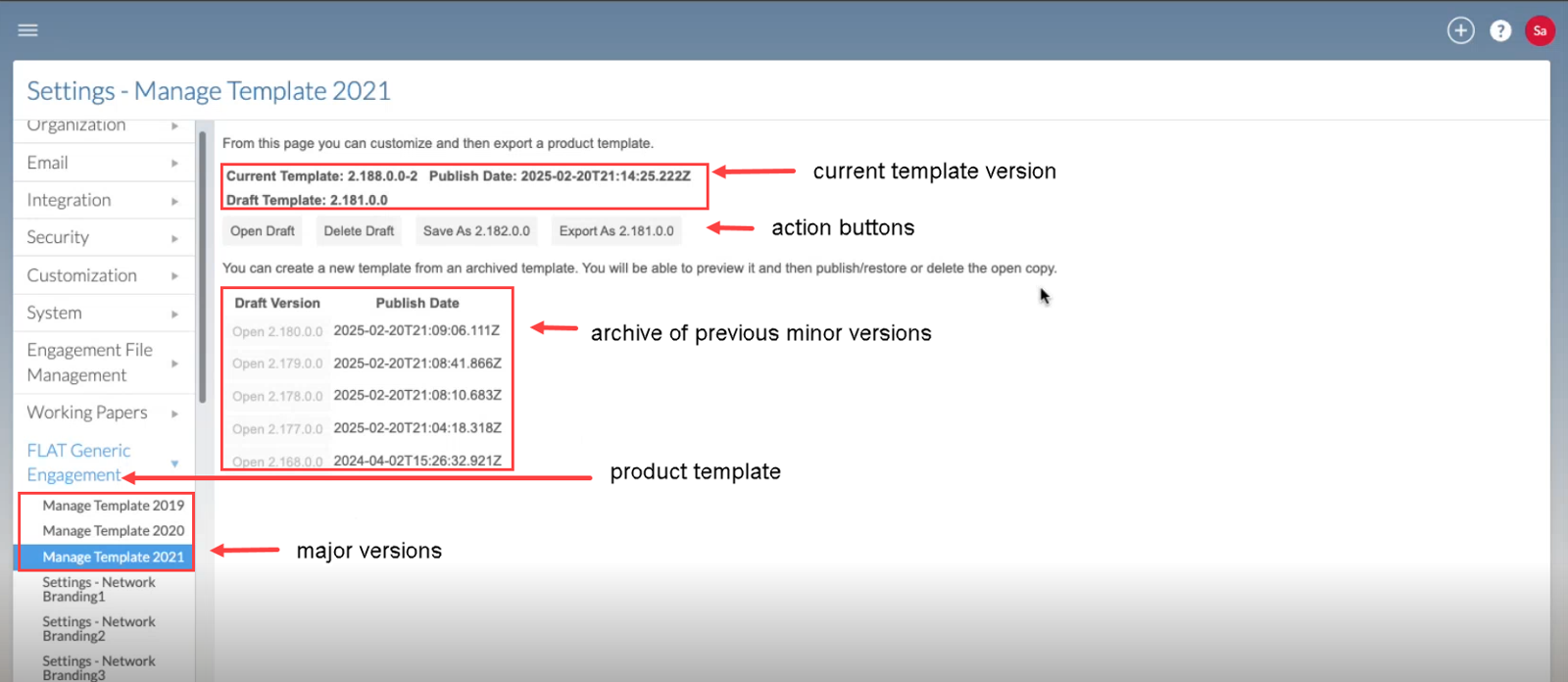
Template types
The enterprise template is created and managed by the enterprise author to enforce a standardized methodology across all firms in the accountancy network. It reflects an organization’s decision to centrally manage guidance and compliance.
An enterprise firm template is a customized version of the enterprise template used by the enterprise firm authors under your global accountancy network.
The following table provides a summary of the relationships between the various templates and authors in Caseware Cloud:
As an enterprise firm author
In Caseware Cloud, each type of template is managed by a different author. As a firm author, you will use the product template to create the firm template for your users to create engagements.
Responsibilities for firm authors:
-
Template management: Create, edit, and delete the templates your Caseware Cloud users rely on to create engagements.
-
Feature customization: Change or add features within your template (for example, components, assertions, areas) to align with your organization’s needs.
-
Release alignment: Track template version updates and apply the latest changes released by Caseware to keep your template current.
-
Feature customization
Feature customization allows you to tailor your templates to match the unique needs of your organization. These customizations ensure that each engagement created from the template reflects your organization’s preferred structure while building on the foundation provided by your enterprise.
To learn more, refer to the list of customizable features under Setup: Authoring index.
Release alignment: template lifecycles and versioning
The enterprise template undergoes continuous improvement life cycles, which include both minor and major updates. These updates are versions of the product template.
Major versions
Major versions of the product template are created by your enterprise and updates all enterprise and firm templates.
Major versions are typically pushed annually or when a significant number of updates are required. These updates affect all firms.
Your job as an enterprise firm author is to accept the major version update and migrate all enterprise firm customizations to your new major version.
For more information on how to accept and apply your enterprise firm customization to the latest major version, refer to: Update after a version release.
Minor versions
-
All authoring levels can release minor versions of their template.
-
Minor versions released by Caseware push changes to the product template that are minor changes to be adopted across enterprises. Enterprise authors push these changes to the enterprise firm templates.
-
If your enterprise firm template is customized, accept the update when notified. A new draft will be created with your customizations carried over automatically.
-
If you have an enterprise firm template that has no customizations, minor version updates will automatically be applied.
Understanding Template Version Numbers
Template versions follow a four-part numbering format:
[Caseware].[Minor].[Enterprise].[Release]
Example: 1.2.3.4
Legend
-
Caseware (1): matches Caseware’s annual product release.
-
Minor (2): indicates a smaller Caseware update or fix.
-
Enterprise (3): means your firm has customized the product template; 0 means it is unchanged.
-
Firm (4): increments each time you publish or update a draft.
To learn more about how to manage your enterprise firm template, refer to: Manage the enterprise firm template.
